How to make a Roblox thumbnail with AI
Updated 7 November 2026 · By ClipClip
The short answer
Take a screenshot of your game's best moment, give it to ChatGPT or Gemini with prompt 1 below, then resize the result to 1920×1080 and upload it under your game's Thumbnails in Creator Hub. Keep everything in it really in your game: Roblox recommends a game less when its picture doesn't match. For ads, Roblox's Ads Manager has an AI of its own.
Four prompts we tested
We tried them on 7 November 2026 with OpenAI's image generator, the one in ChatGPT, on a screenshot of a friend's tycoon game. Change the words in brackets for your game; in Gemini, paste them the same way.
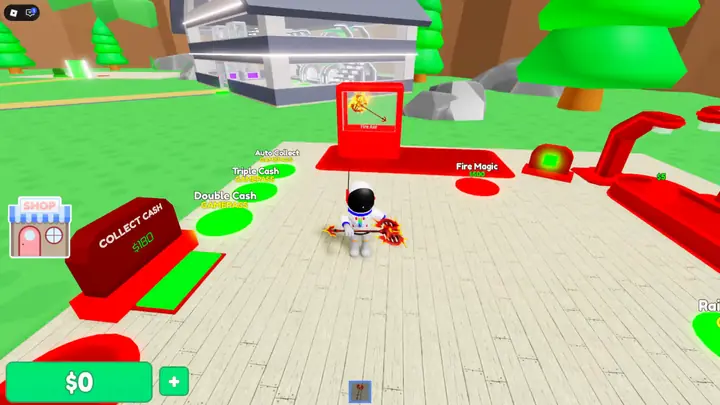 The screenshot
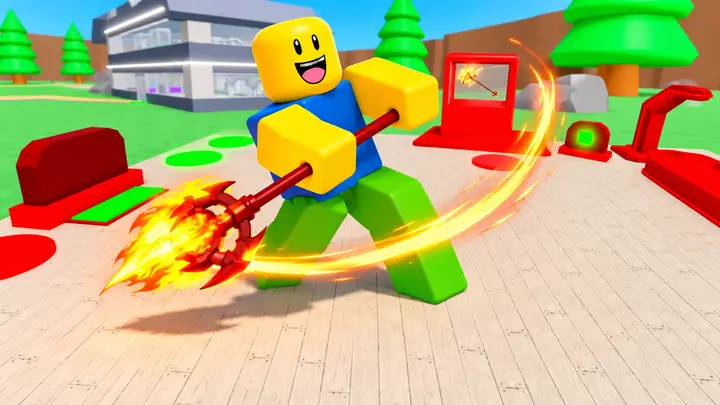 Prompt 1
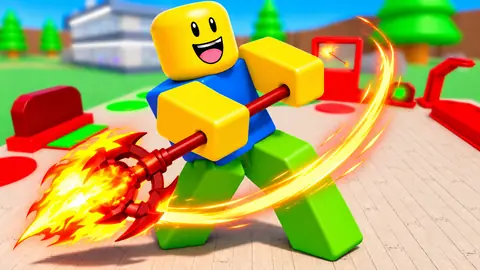
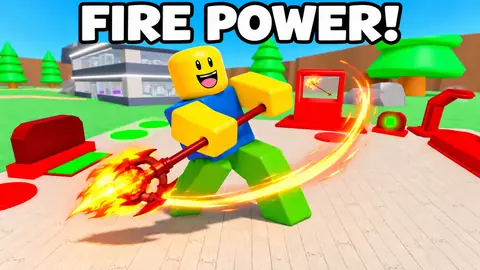
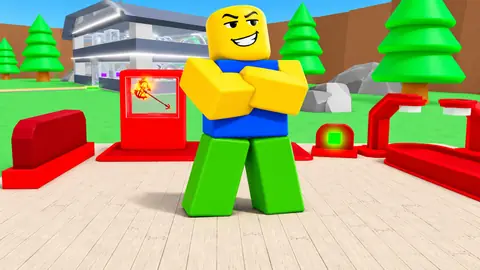
The second idea came out weaker than the first: a pose says less than an action. Ask for moments that show what players do, and keep the best ones.
From screenshot to Home, step by step
- Pick the moment that shows what players do: your game's action, its prize or its danger. Any screenshot works: prompt 1 removes the buttons and menus.
- Paste prompt 1 into ChatGPT or Gemini with the screenshot attached, its brackets filled in.
- Change one thing per message, as prompts 2 and 3 do, so the rest of the picture stays close to what you liked.
- Add words last, if any, then check every letter: image AIs can misspell.
- Look at it small, the size of a tile on your phone's Home. If you can't tell what's happening, use prompt 2.
- Make it 1920×1080. Image AIs give other sizes (ours came out 1672×941): resize it to 1920×1080, under 3 MB, in any editor, Photopea for one, free in the browser. Roblox stretches any other shape to 16:9.
- Upload it in Creator Hub: your game, then Thumbnails, the Home Page tab for Home and the Experience Detail Page tab for your game's page. Every size: Roblox thumbnail size.
- Make 2 to 5 with prompt 4 and let Roblox test them: with two or more active on Home, Thumbnail Personalization shows each player the one that works best for them. In Roblox's tests it raised games' qualified play-through rate by 8.5% on average.
Roblox's own AI, for ads
- In Ads Manager, a campaign's Creatives have an AI generate button, and the Asset library a Generate one: pick your game, describe the picture, and it makes three. You can bring your own game images, already moderated, into the description.
- When it launched, on 24 July 2026, it was free for up to 100 prompts a day. Every asset is moderated, usually within 48 hours, and a campaign shows up to 10 thumbnails and reports how each one performed: a quick test of which idea works.
- Several developers answering Roblox's announcement said its pictures didn't look like Roblox. Starting from your own screenshot keeps your game's look.
Keep it true to your game
- Roblox moderates every thumbnail against its Community Rules and Terms of Use, and holds you responsible for what you publish, even when an AI made it.
- It recommends a game less, and ranks it lower in search, when its pictures don't match the gameplay: its own example is a dinosaur thumbnail on an obby with no dinosaurs.
- Pictures that copy another game's are recommended less too: don't ask an AI to remake someone else's thumbnail.
- Let the AI change the light, the colors, the camera, the pose and the player's look. Don't let it add items, places, creatures or features your game doesn't have.
- Keep words and key objects out of the bottom, where Roblox's player count can cover them.
- Since 19 October 2026, a game with only Roblox's default thumbnail gets no Home recommendations: upload at least one of your own.
What the chart games' thumbnails show
On 6 November 2026 we read the thumbnails of the 905 games on Roblox's charts: 72% show a character or a creature, 46% a face with an expression, 66% are posed 3D scenes against 17% plain screenshots, and 57% have no words besides the logo. Prompt 1 asks for the same. The whole study: how to make a high-CTR Roblox thumbnail.
Or let ClipClip do it
We make ClipClip, so weigh this part accordingly. Its thumbnail maker does these steps for you: you record a few minutes of your game, and it finds the strongest moments, plans each thumbnail on what wins in your genre, makes the player the bacon or the noob, writes the words by code so they're spelled right, and gives you 1920×1080. What it made for five games. ClipClip launches soon: press Notify me below to hear the day it opens.
Questions
Can AI make a Roblox thumbnail?
Yes. ChatGPT and Gemini turn a screenshot of your game into one (the prompts above), and Roblox's Ads Manager makes ad thumbnails from a description.
Does Roblox allow AI-generated thumbnails?
Yes: Roblox's own Ads Manager makes them. Like every thumbnail, they're moderated, and Roblox shows a game less when its pictures don't match what players find in it.
What is the best AI prompt for a Roblox thumbnail?
One that starts from a screenshot of your game and asks for one moment, one big character with one emotion, brighter colors, no buttons or menus, and nothing your game doesn't have. Prompt 1 above does that; we tested it.
What size should an AI Roblox thumbnail be?
1920×1080, 16:9, under 3 MB for the ones you test on Home. Image AIs often give other sizes (ours came out 1672×941), so resize it before you upload: Roblox stretches any other shape.
Why does my AI thumbnail have spelling mistakes?
Image AIs can get letters wrong. Put the words in quotes, as prompt 3 does, check every letter, or add them yourself in an editor like Photopea.
Is there a free AI thumbnail maker for Roblox?
Roblox's Ads Manager made thumbnails at no cost, up to 100 prompts a day, when it launched in July 2026, for ads. ClipClip, launching soon, makes 1 a month from your gameplay on its free plan.
How many thumbnails should I make?
Two to five active on Home, so Roblox can test them against each other. Your game's page can show up to 10 images or videos.
Sources
- Roblox Creator Hub, Thumbnails, read 7 November 2026
- Roblox Creator Hub, Discovery, read 7 November 2026
- Roblox Creator Hub, Ads Manager, read 7 November 2026
- Roblox, Leveling Up Ads Manager With New Features (DevForum), 24 July 2026
- Roblox, Home recommendations now require a custom thumbnail (DevForum), 19 October 2026
- Roblox Creator Hub, Games with Generative AI, read 7 November 2026
- ClipClip, the chart games' thumbnails (Roblox's public data, measured), measured 6 November 2026